24/7
in continuous live use
Since 2025
proven at a major European hub airport
EU-hosted
your data stays in Europe · Made in Germany
Live
every change shows up on every screen at once
What it is

One shared picture — not another system to run.

Not surveillance

It shows what is happening and who is handling it — not who is slacking. Everyone sees only what they are meant to, and it is built to satisfy your works council.

Not a year-long rollout

Nothing to install. It opens in the browser, and you can be live in days — starting with a single area.

A typical morning

06:12. An escalator stops. Here is the difference.

The scenario every operations team knows — and how it runs when everyone sees the same picture instead of chasing it over the radio.

05:40
Early-shift briefing

The night shift’s incidents are written down — not stuck in someone’s head. The duty manager reads the open items in two minutes.

06:12
An escalator stops

A sensor flags it before the first phone call. The watch point turns red on every screen at once — across the whole site.

06:14
Someone is put in charge

The duty manager hands it to the maintenance team. What is being done — a technician on the way — is written on the incident for everyone to see. Nobody has to ask who is handling it.

06:31
Fixed — with a record

The escalator runs again. The incident closes with times, actions and comments attached. The report writes itself.

14:00
Shift handover

The afternoon shift reads the picture instead of a verbal recap. Nothing gets lost between shifts.

For your whole operation

Three groups have to say yes. OpsRoom is built for all three.

Operations leadership

The numbers to run — and defend — the operation

  • Clear figures from real incidents: how fast you respond, where the hold-ups are
  • A complete, time-stamped record for regulators and reporting
  • A business case in staff hours, not buzzwords
Control room & duty managers

One picture instead of five phone calls

  • Every watch point, every incident, live on one screen
  • Set the readiness level site-wide or area by area
  • Alerts follow clear rules, not gut feel
Field & maintenance teams

Reporting faster than reaching someone on the radio

  • A short form on the phone — a handful of fields
  • Opens from the browser — no app store, no rollout project
  • A ping when something needs them
+

Three groups champion it — but IT, purchasing and, in Germany, the works council take a look too. OpsRoom is built for that room: everyone sees only what they are meant to, your data stays in Europe, there is a complete record of every change, and it is designed to satisfy a works-council agreement.

Features

One shared, organised place for what’s happening — across the whole site.

01 · Live overview

Your whole operation, at a glance.

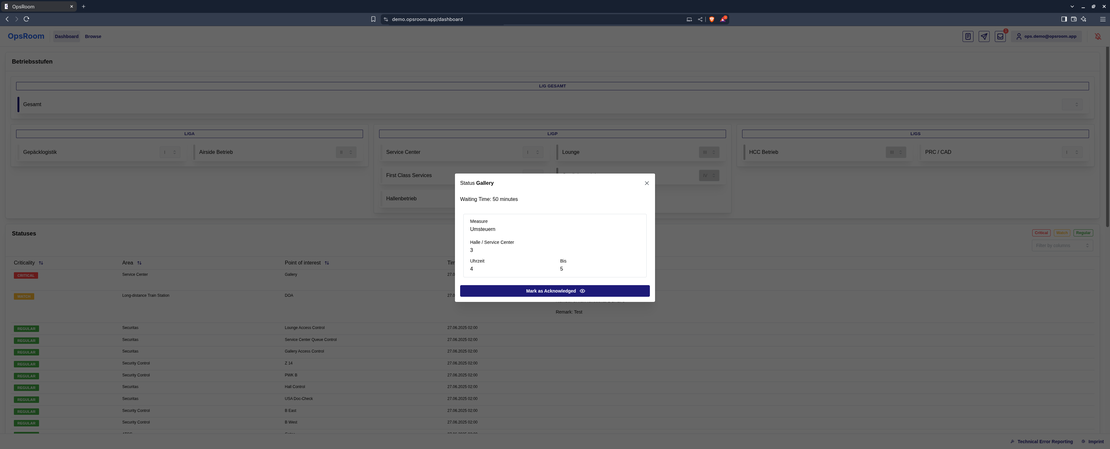
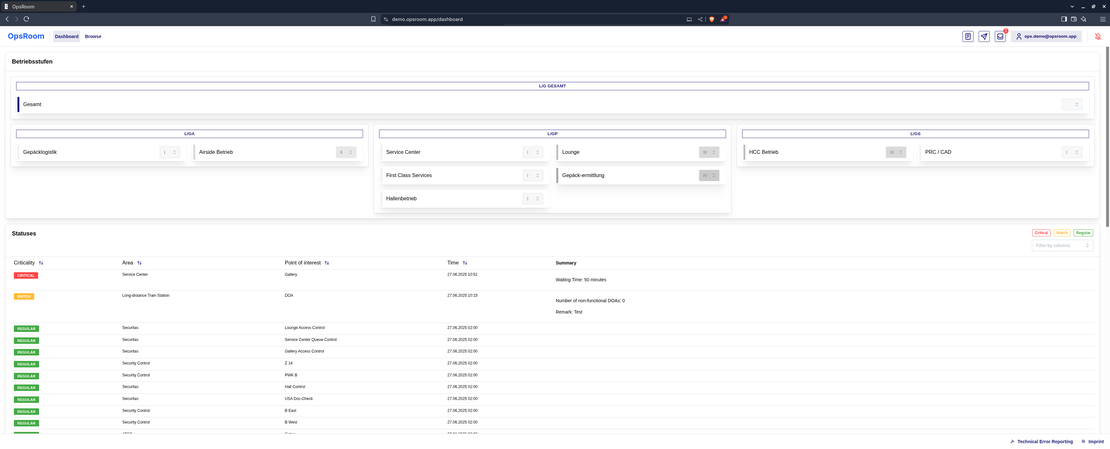
A live screen shows the status of every watch point across the site. Colour-coded by urgency, so it is instantly obvious where attention is needed — and it updates on its own, with no refreshing.

  • Updates the instant something changes — no refreshing
  • Optional map view based on your real floor plans
  • Filter by urgency, labels and favourites
dashboard — live overview
02 · Structured reporting

Report incidents with a form, not free text.

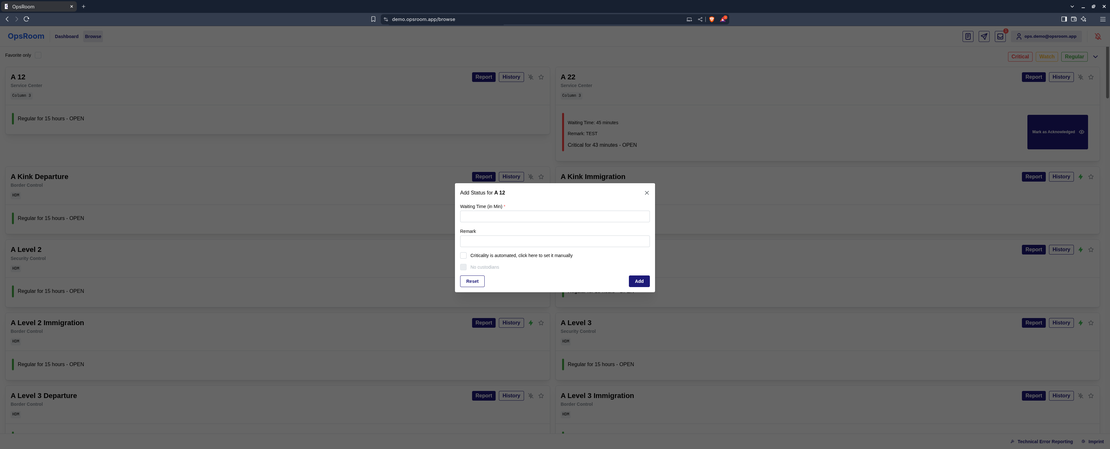
Anyone with permission opens an incident right in the app, on desktop or phone. Each kind of watch point — an entrance, a queue, a lift, a zone — has its own short form that captures exactly the right details: who, what, how urgent, when.

  • A tailored form for each kind of watch point
  • Relevant details carry over from the last report
  • Who reported it, when, and how urgent — captured for you
report — structured form
03 · Workflow & collaboration

Every incident follows a clear process.

Incidents move through set steps from report to resolution, and everyone notes what they are doing right on the incident. Comments replace radio chatter with a record you can search.

  • Clear steps (e.g. Reported → In progress → Resolved)
  • Documented actions — who is doing what, since when
  • Time-stamped comments, by name, on every incident
incident — process & actions
04 · Sensors & automation

Data reports itself — and raises the alarm on its own.

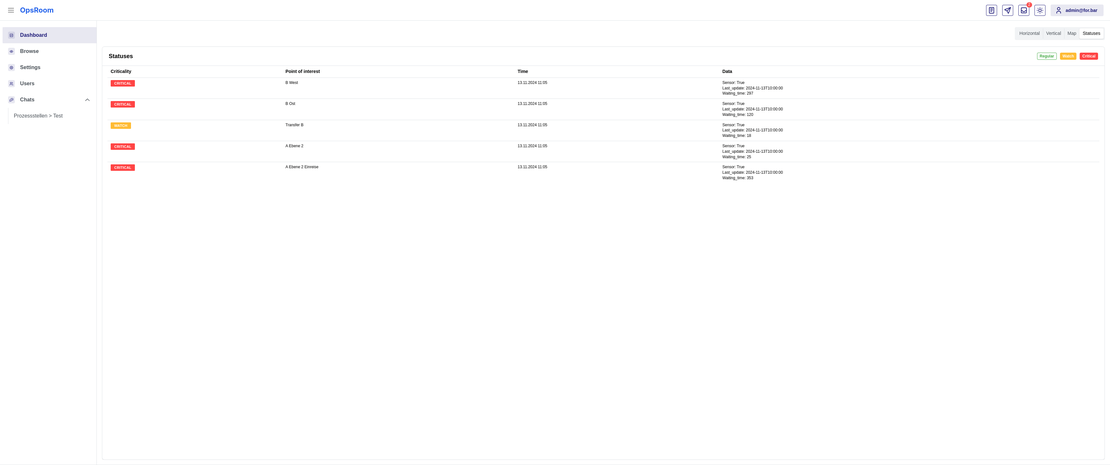
OpsRoom can connect to your existing sensors and update watch points with no one lifting a finger. At a major European hub airport, waiting-time sensors feed in this way. Urgency is worked out automatically from simple rules you set — consistent, instead of guesswork.

  • Works whether your systems send the data or OpsRoom fetches it
  • Warns you if a sensor goes quiet
  • Simple rules you set — e.g. waiting time over 20 min → urgent
a watch point fed by sensors
05 · Operating levels

Your site’s overall state — on one scale.

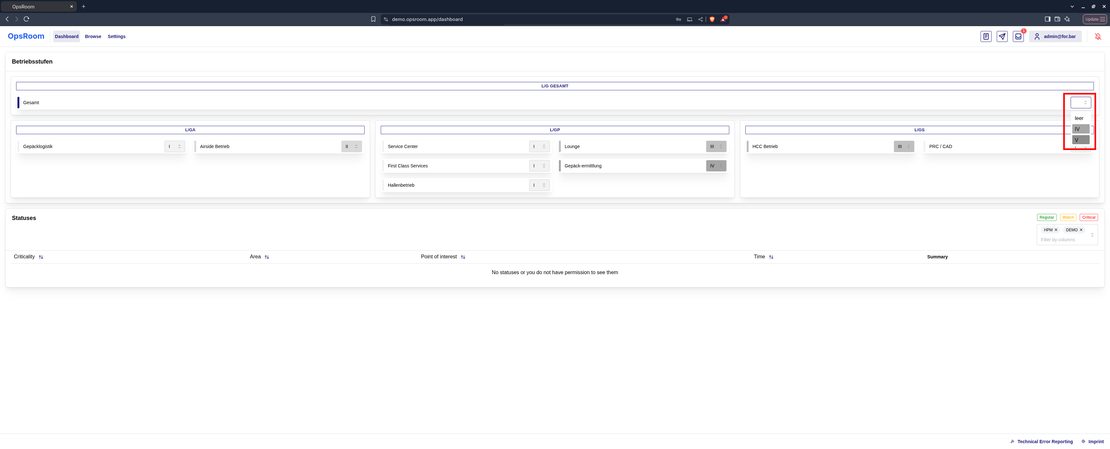
Readiness levels capture the overall state of the operation (e.g. Normal → Heightened → Emergency). You can set them site-wide or area by area — a building, a floor, a zone — and they can trigger notifications, change what is shown, or record the reason.

  • One site-wide readiness indicator
  • Set them all at once, or area by area
  • Teams grouped by job and area
operating levels — site-wide
06 · Operational news

Targeted announcements — to the right teams.

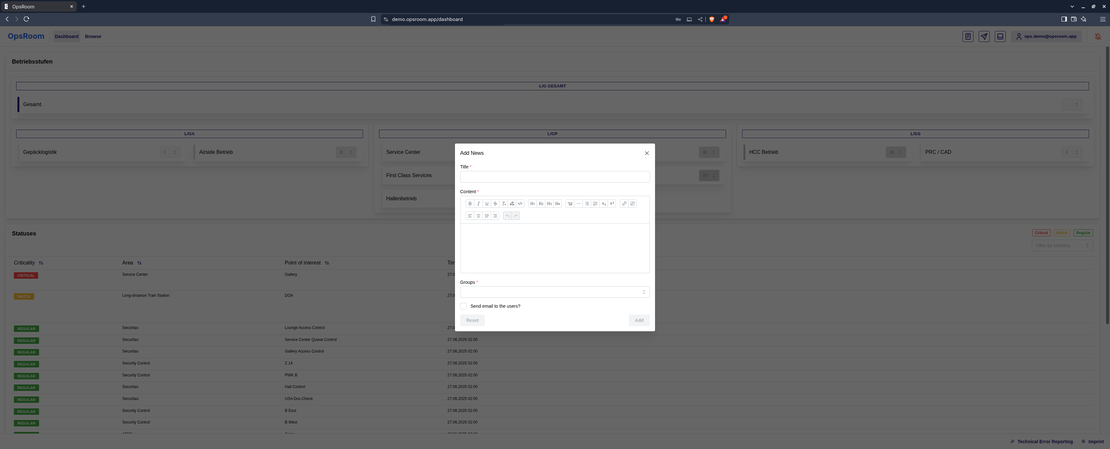
Publish a note in a simple editor and choose who sees it — security only, everyone, or a single area’s team. With a full history you can search after the event.

  • Formatted text and links
  • Choose exactly which group sees it
  • Delivered by notification and email
news — targeted announcement
07 · Mobile in the field

For teams out on the site — on their phones.

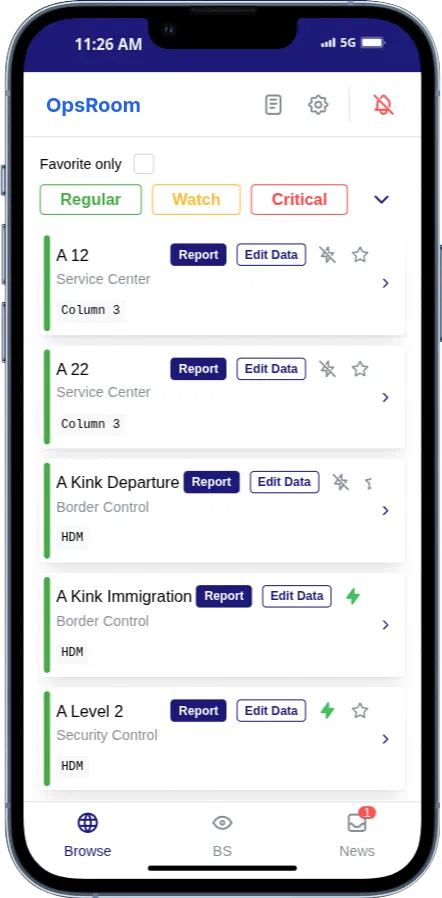
A phone view built for fast reporting and quick status checks, without the full desktop screen. It installs like an app straight from the browser on Android and iPhone — with all the live updates and alerts.

  • Installs like an app — no app store
  • Browse, report and check readiness on the go
  • A ping straight to the watch point that needs attention
mobile — installs like an app
Where it fits

Built for any large, busy site.

Airports, stadiums, stations, factories, data centers, warehouses — the same live picture for any big operation where things move fast and go wrong.

Airports

Security checkpoints, gates, baggage areas, borders, lounges, parking

Stadiums & arenas

Entrances, concourses, stands, exits, first-aid points, car parks

Stations & transit

Platforms, ticket halls, escalators, lifts, exits, passenger flows

Factories & logistics

Lines, conveyors, loading bays, gates, safety points

Data centers

Halls, access points, power and cooling rooms, secure cages

Warehouses & storage

Aisles, docks, cold stores, gates, picking stations

Case study

In round-the-clock use at a major European hub airport.

An airport is about the most demanding busy site there is — and one of Europe’s busiest hub airports runs its day-to-day coordination on OpsRoom, under its own name and brand. Waiting-time sensors feed the picture on their own, and the readiness levels cover the whole operation. For the confidentiality that is normal in aviation we don’t name them publicly — but for a serious evaluation we can arrange a reference call under a confidentiality agreement.

24/7
in continuous live use since 2025
Automatic
waiting times flag themselves
Own brand
runs entirely under the operator's own name
Whole site
readiness levels across the whole operation
What the old way costs

Radio chatter has a price tag.

Every incident coordinated over radio, phone and status-chasing burns staff time. Estimate what that costs at your site — with your own numbers.

Illustrative estimate based entirely on your inputs — no data leaves your browser. We'll gladly work through your real case in a demo.

Staff hours spent on coordination per year
h
Your coordination cost per year
Trust & security

Built to pass the security and purchasing review.

Hosted in Germany / the EU
Your operational data stays in the EU. Nothing leaves it.
Privacy by the rules
GDPR-compliant, and it only keeps the data you actually need.
Nothing is ever really deleted
Incidents and news are kept with a full history — never quietly erased.
Everyone sees only what they should
Access is set per person, per group and per individual watch point.
Ready for critical-infrastructure rules
Big, critical sites carry extra security obligations — OpsRoom is built for that scrutiny.
Made in Germany
Built and supported in Germany, in German and English.

A security overview and data-processing agreement are available on request. Ask us where we stand on formal security certifications today.

Pricing

Start free. Grow with your operation.

OpsRoom is a web-based service — hosted in the EU, nothing to install, up and running in days. Enterprise can also run it on their own servers. Most teams start with Team.

Starter
Free
forever

For small teams that want to leave the radio-and-paper routine behind.

  • Up to 5 users
  • 1 site, up to 25 watch points
  • Live overview & phone app
  • Structured incident reporting
Get started
Most popular
Team
€12
per user / month

For operations teams that need set processes, sensors and a full record.

  • Everything in Starter
  • Unlimited watch points
  • Set processes & readiness levels
  • Sensor connections & automatic alerts
  • Full record & reports
  • Email support
Start with Team
Enterprise
Custom
request an offer

For operators of several sites with their own requirements.

  • Everything in Team
  • Several sites & unlimited users
  • Your branding, your web address
  • Log in with your company account, fine-grained access
  • On your own servers, if you prefer
  • Service agreement, onboarding & dedicated support
Get in touch

All prices excl. VAT. Hosted in the EU · Made in Germany.

Start small

Try it in one area first.

You don’t roll coordination software across a whole site on faith. Start with one area, a set of watch points you choose, and success measures you set — how fast queues get handled, how clean the handovers are, how ready you are for an audit. The trial gives you the proof for the wider decision.

  • A structured trial with success measures you set together
  • Nothing to install — live in days
  • Your data stays in Europe, with a complete record of every change
  • Set up to pass IT and works-council review
  • If it doesn’t prove itself, you walk away
Talk about a trial →
FAQ

The questions operations managers ask us.

What is OpsRoom? +

OpsRoom is one live picture of your whole operation, used on any device. Your teams see every watch point — entrances, queues, lifts, key equipment — report incidents with a simple form, get automatic alerts from sensors, and keep a complete record of everything. It is a web-based service, so there is nothing to install.

What kind of sites is it for? +

Any large, busy site where things move fast and go wrong: airports, stadiums and arenas, stations and transit, factories and logistics, data centers, warehouses and storage. Wherever teams coordinate incidents over radio, phone and paper today, OpsRoom gives them one shared picture instead.

How fast can we go live? +

Days, not months. There is nothing to install. We set up your watch points, roles and processes in a short workshop, and your team reports its first incidents the same week.

Is this another big, heavy system to run? +

No. OpsRoom is a light coordination layer on top of what you already run. It replaces radio calls, WhatsApp groups and paper logs — and connects to your existing systems rather than replacing them.

What is OpsRoom not? +

It is not a planning, staff-scheduling or video-surveillance system — and it doesn’t try to be. It is the place where people and sensors report what is happening and everyone sees the same picture. The systems you already run stay exactly where they are; OpsRoom connects to them.

Where is our data — and is it safe? +

In the EU, privacy-compliant, made in Germany. Access is set per person, group and individual watch point. Every change is kept in a full record; nothing is ever quietly deleted. Enterprise customers can also run OpsRoom on their own servers.

Do we need new sensors or hardware? +

No. OpsRoom works from day one with people reporting on their phones. Connecting sensors is optional — when you are ready, your existing systems can feed data in and raise alerts automatically.

Will field staff actually use it? +

That is what it is built for. The app installs from the browser — no app store, no rollout project. Reporting an incident is a short form with a handful of fields, faster than reaching someone on the radio.

Does it work for smaller sites? +

Yes — the Starter plan is free for up to 5 users, and it scales from a single area to several sites. You only move to the paid plans when your operation does.

What does it cost? +

Starter is free forever. Team is €12 per user per month. Enterprise — several sites, company login, your own servers, your branding — is a custom offer. See the pricing section above or just get in touch.

Can we run it under our own brand? +

Yes. Name, logo, colours and fonts are set per customer — Enterprise customers run OpsRoom entirely under their own name and web address. A major European hub airport does exactly that today.
Get started

See OpsRoom at your site.

We’ll show you in a short demo how OpsRoom turns your operation into one shared, live picture — tailored to your watch points, roles and process.

A 30-minute live demo, along your own use cases  ·  No installation, no commitment  ·  An honest read on whether OpsRoom fits your operation

Request a demo →